Friday, April 25, 2008

Microsoft's piracy problem could grow


When it comes to software piracy, Microsoft may just be aiding the enemy.


Microsoft has been counting on gains against unlicensed software to boost revenue from the Windows unit, which accounts for a huge chunk of overall profits and sales. However, one of the company's own decisions could make its antipiracy battle more difficult.


With Windows Vista, Microsoft took an extremely tough stand on piracy. Computers that were not properly activated within a short period of time went into a virtually unusable state known as "reduced functionality mode."


In the newly released Service Pack 1, however, Microsoft is softening its stance somewhat. The reduced functionality mode is gone, and in its place, a series of warnings and visual indications that a computer is not running a genuine copy of Windows.


I would argue, though, that having an unusable copy of Windows is a far greater deterrent than having one that simply labels its user a pirate. Microsoft has maintained that the new approach will be just as effective and is more palatable to customers and partners. Color me skeptical.


But, will the changes automatically lead to an uptick in overall piracy rates? That's a more complicated question.


On its face, it would seem the answer would be a clear "yes."


However, there are a couple of other factors to keep in mind. First, Windows XP is pirated far more than Vista (at least 2 to 1, according to Microsoft). Also, Microsoft did close several notable hacks to its Vista protection scheme with SP1. So while the price for piracy is arguably lower, Microsoft has closed a few loopholes that let pirates bypass the security features altogether.


Time will tell whether Microsoft's technical changes will have an impact on the broader piracy issue. Enforcement is also key, with Microsoft CFO Chris Liddell noting that a couple of legal actions can make a big difference in any given quarter, suggesting true gains (or losses) from piracy require looking at a longer time horizon.


What is clear is that piracy rates remain a critical issue for Microsoft, which needs to continue growing its Windows revenue and profits to help fund its advertising battle against Google.


Microsoft had seemed to be making major headway against piracy, surprising analysts and itself in the September quarter by gaining 5 percentage points of growth through piracy reductions. Last quarter, though, Microsoft actually saw piracy rates head upward, reversing what had been a particularly positive trend for the company.


Microsoft now expects its gains for the year to be just a percentage point or two, though it believes it can continue to see improvements next year as well.


"Piracy is a tough battle and an area where we will need to continue investing," said Colleen Healy, Microsoft's general manager of investor relations.

Yahoo’s New Social Strategy


Yahoo officials presented yesterday during a “Web 2.0” conference
their plans for the site’s major makeover. The new direction searches for new
advertising opportunities, as the site is going to host applications from other
online services turning Yahoo into one of the biggest social hubs on the web.


Ari Balogh, Yahoo's chief technology officer, was quoted by
the Associated Press telling the crowd: "We are going to rewire the entire
experience at Yahoo to make it social in every dimension."

The plan is to allow its hundreds of millions of users to
enjoy the old services such as Web mail, instant messaging and calendar but also
include new features which contribute to the social experience, features made
popular by social networks such as MySpace and Facebook.

"It is rewiring Yahoo from the inside out, across all
of our properties, to fundamentally open up those Web services and provide a
consistent development model, a consistent deployment and consumer experience
as well," concluded Ari Balogh.

Yahoo also attempted to break into the Internet
social scene by launching in 2005 a network called “Yahoo 360.” Unfortunately
the application was recently closed due to a rather small impact in the media.

The new strategy is expected to be completed by the end of
the year and an official launch date will be presented in the weeks to come.
The move is believed to also raise the bar for the other major players such as
Google, Microsoft, MySpace and Facebook.

Thursday, April 24, 2008

Red Hat publishes Fedora 9 preview

Red Hat publishes Fedora 9 preview
Red Hat has published a "preview release" of Fedora 9, the next version of its freely available Linux distribution, which will be the last public release before the final edition next month.


The final version of Fedora 9 was initially planned for next week, but the release has been put back by two weeks to May 13, according to the Fedora Project.


Among the updates to Fedora 9 are improvements to the Xen hypervisor, support for new file systems, and the inclusion of newer versions of the Firefox browser and the KDE desktop environment.


"This is the most critical release for the Fedora community to use and test and report bugs on," Red Hat's Jesse Keating said in a release announcement.


Red Hat initially released the preview as a BitTorrent download, and it is planning direct HTTP downloads for this week. Users can choose from Live images--which execute from a disc, without the need to install--or standard CD or DVD installers.


The final version is also scheduled to include the recently released Linux 2.6.25 kernel. A release candidate is also scheduled for May 1, but it is primarily for a smaller group of testers.


Among the new features are improvements to the Xen virtualization hypervisor, the addition of support for the ext4 file system and encrypted file systems, and upgrades to Firefox 3 and KDE 4.0.


In March, Red Hat released new beta versions of its enterprise and desktop Linux products, with improvements including better virtualization and clustering features, to make the operating system a more stable platform for server farms.


Red Hat Enterprise Linux (RHEL) 5.2 beta upgraded the core virtualization hypervisor, Xen, to Xen 3.1.2, and allowed support for up to 64 processors per system and up to 512GB of memory per server. The Numa (nonuniform memory access) interface was also improved.


Some users have criticized Red Hat for neglecting its freely available distribution while focusing on its more profitable enterprise version. In February of last year, Eric Raymond, a key figure in the open-source community, transferred his allegiance from Fedora to Ubuntu. At the time, he cited issues such as "chronic governance problems," problems with maintaining repositories, "effectively abandoning the struggle for desktop market share," and "failure to address the problem of proprietary multimedia formats."


Last week, Red Hat quashed speculation that it was planning a consumer desktop version of Linux to compete with Windows, saying it is focused on enterprise systems and would not be able to make such a product profitably.

Yahoo’s Starting Point: A Clearer Strategy


I’ve been a rather harsh critic of Yahoo’s quarterly earnings calls. In January, I called the effort by Jerry Yang and Sue Decker to justify the company’s weak performance a “droning, jargon-filled” explication of a “vision-goes-here strategy.” Two days later, a letter from Redmond arrived with an offer that Yahoo is still working hard to refuse.

Today, Yahoo’s call might not have been a model for inspiration, and there was a lot to roll your eyes at as executives praised financial results that trailed far behind those of Google on most every metric.

Still, I was impressed, especially by the section where Ms. Decker, the company’s president, outlined Yahoo’s strategy. It is still arranged around two buzzwords: being a “starting point” for Internet users and being a “must buy” for advertisers. But what Ms. Decker said that Yahoo plans to do within those strategies was much more sharply defined, and plausible.


I suspect the process of spending $13 million worth of time with investment bankers and consultants (not to mention nights dreaming of the damage that could be done by the barbarians from the north) helps sharpen the thinking.

I’m not so much reacting to any revelations, but a clarity of explanation that I would hope could help rally both employees and customers. A few tidbits:

The “Starting Point” idea, as Ms. Decker explained it, implies two breaks from Yahoo’s past. First, instead of spreading the peanut butter of its efforts across hundreds of sites, it will devote the bulk of its resources to the handful of sections that get the most traffic: the home page, search, news, e-mail and a few others.

Second, the measure of success becomes how often users visit, not how long they stay. That encourages the company’s product designers to be more liberal in linking to other sites and opening Yahoo’s interface to a variety of outside applications and partnerships. You can see some of that in Yahoo Buzz, its Digg-like news site, which often provides links to other sites on Yahoo’s home page.

“When we think of ourselves as a starting point, rather than a destination, all of us become more focused on simplifying users’ lives,” she said.

This openness, of course, is a response to the power of Google; not just search, but Google News and iGoogle, all of which are a model of starting points with little effort to link to Google properties.

Ms. Decker articulated Yahoo’s approach to weaving social features throughout its site.


“We are not trying to be another social network,” she said. “Rather, by linking users’ favorite destinations and content, with their friends’ families and communities, we can deliver better relevance on a scale that no one else has achieved.”

Yahoo has been talking about variations of this strategy since the fall, and yet we still haven’t really seen any significant result.

As for Yahoo’s advertising strategy, Ms. Decker started referring to the company’s focus on “premium partners,” by which she meant newspapers and other media companies, like Forbes, with whom the company is aligning. She didn’t say as much, but this seems like a sensible way to contrast Yahoo’s advertising network with those of Google and AOL, both of which work with the broadest range of publishers, big and small.

Many traditional media companies worry that the rise of advertising networks is undercutting their prices and turning their precious advertising space into a commodity to be traded like pork bellies. There may well be an opportunity for Yahoo to define itself as the ad network that is especially friendly to mainstream media.

Of course, Yahoo is not in reality keeping the online ad world limited to the old country club set. It owns the Blue Lithium ad network, and the Right Media exchange, which is the most active pork-belly pit for cheap online ads.

But at least Yahoo can say to publishers that it feels their pain. The rise of cheap “non-guaranteed” advertising space has dragged down Yahoo’s revenue, Ms. Decker said.


I wonder if there is a bit of a conflict between these two strategies. Can Yahoo really be the most open starting point for Web users if it also wants to help bolster old-guard companies. You can already see that in the new Yahoo Buzz. Unlike Digg, where users submit stories for other people to vote on, Buzz offers its users the chance to express opinions about stories from a handpicked list of about 100 publishers.

It’s true that limiting its starting point to sites with which it has business deals will “simplify users’ lives,” although I’m not so sure that sort of simplification will win a lot of converts from Google.

But Yahoo clearly will benefit, because Ms. Decker is simplifying and clarifying her description of what she wants the company to do.

ProductCart e-commerce software now integrated with Google Website Optimizer

Mission Viejo, CA (PRWEB) April 23, 2008 -- Early Impact, publisher of the ProductCart line of shopping cart software, today released an update for its e-commerce software that makes it easy for a ProductCart-powered Web store to take advantage of Google Website Optimizer.


ProductCart now integrates with Google Website Optimizer

ProductCart now integrates with Google Website Optimizer


Knowing what combination of content works best on your e-commerce Web site's home page is information all store managers would like to have


ProductCart is a popular shopping cart program used by thousands of Internet merchants. The new features will help these merchants use Google Website Optimizer to dynamically serve different variations of content on key landing pages, such as the store's home page. Merchants will then be able to measure what works best, thus reducing the bounce rate on those pages, and improving the overall conversion rate for their Internet store.


For example, consider a ProductCart-powered store's home page:

  • ProductCart contains features that make it easy to dynamically control what is shown on the home page
  • However, it's not easy for merchants to know what combination of content could deliver the best results (lowest bounce rate, and highest conversions)
  • Store managers can now use Website Optimizer to serve different variations of key page sections such as the top headline and main section, and find out what works best
  • This is done without needing to change any settings within ProductCart, but rather simply by uploading a slightly modified version of the home page (home.asp)
For example, Google Website Optimizer is being used by Early Impact to display a different headline and main banner on the company's e-commerce software store home page (visit the page with different browsers to see different versions).


"Knowing what combination of content works best on your e-commerce Web site's home page is information all store managers would like to have," said Massimo Arrigoni, CEO of Early Impact. "Google Website Optimizer can take a lot of the guess work out of the equation, and now it's really easy for ProductCart users to take advantage of it."


The ProductCart storefront pages edited for use with Google Website Optimizer are available immediately, free of charge to ProductCart users. For details and installation instructions, visit the new ProductCart WIKI-based documentation Web site.


ProductCart is available starting at $695 per storefront.

Microsoft Live Mesh platform takes on Google, Adobe


As with most core strategies at Microsoft, Live Mesh has a strong platform angle.


At the Web 2.0 Expo on Tuesday, Microsoft unveiled Live Mesh, a cloud service for synchronizing files, folders, and Web-delivered content, such as news feeds, across multiple devices.


Along with giving people access to a test version, the company offered a tech preview that will allow developers to access the Mesh APIs to write Web applications with the data-syncing features.


People have long said Microsoft doesn't "get" the Web or is too tied to its desktop heritage. Well, part of the PC legacy is the hard drive, as in "your information."


With Ray Ozzie as chief software architect, Microsoft is tackling one of the trickiest computing problems of the day: data.


In the Live Mesh blog, Microsoft general manager Amit Mital laid out the guiding principles for developers:


• Services Are the Core of the Platform--the Live Mesh platform exposes a number of core services including some Live Services that can all be accessed using the Live Mesh API; these include Storage (online and offline), Membership, Sync, Peer-to-Peer Communication and Newsfeed.


• Same API on Clients and in the Cloud--the programming model is the same for the cloud and all connected devices, which means a Live Mesh application works exactly the same regardless of whether it's running in the cloud, in a browser, on a desktop, or on a mobile device.


• Open, Extendable Data Model--a basic data model is provided for the most common tasks needed for a Live Mesh application; developers can also customize and extend the data model in any fashion that is needed for a specific application.


• Flexible Application Model--developers can choose what application developer model best fits their needs.


Reaction among developers and tech bloggers has been generally positive, likely because Live Mesh seems to serve a real need for people with multiple devices. Developers also shed light on how the platform helps Microsoft competitively.


Josh Catone at ReadWrite Web said that Live Mesh brings offline access to Web applications, much like Adobe AIR and Google Gears (which is still in development). Catone writes:


"Web apps using the Mesh platform will be able to lean on the client software to take their Web applications offline, including all user data, and sync it up when the user gets back online at a later time.


Microsoft is taking an offline approach that is more akin to Google Gears or Mozilla Prism than Adobe AIR--the Web-to-desktop functionality of Mesh is essentially a wrapper for the actual Web app.


Ryan Stewart, a rich Internet application (RIA) evangelist at Adobe Systems, pointed out how important Live Mesh is to getting Silverlight, Microsoft's alternative to Adobe Flash, onto more devices. Live Mesh only works on Windows machines now, but Silverlight runs on the Mac OS, Linux through Moonlight, and mobile devices. Stewart writes:


"As an RIA fan boy, I'm excited to see what people build on top of Live Mesh because I think it tries to solve the right problem. We should just have access to our data. It shouldn't matter if we're in the browser, on the desktop, or on a device. That's a goal I think both Adobe and Microsoft share and I think the next couple of years are going to be great in unifying the Web and getting rid of 'Web application' versus 'browser applications.' They're just going to be applications when all is said and done."


Meanwhile, all that talk of Web OSes or Webtops seems to be coming from Microsoft, the company with presumably the most to lose as computing moves from the PC to the Web.


"Is this like a WebOS (Webdesktop, Webtop?)--yes, although everyone seems to be avoiding the term, this is a lot like all those WebOS apps you've seen. You get a virtual desktop with 5GB of storage and you can access it from anywhere. It's integrated with Windows' Remote Desktop, so it's really simple to set up," writes Stan Schroeder at Mashable.


What developers actually do with the Live Mesh platform remains to be seen. But third-party applications are key to delivering on its promise.

10 killer texting tricks


April 23, 2008 (PC World) To many people over the age of 30, text messaging can seem like one of those strange, complicated behaviors only teenagers understand. In reality, it's one more great tool in your productivity arsenal, right up there with e-mail and instant messaging.

In function, texting treads a fine line between those two communication capabilities, essentially serving as a basic form of e-mail for even the simplest of today's cell phones. Text messaging relies on a decades-old technology called SMS (Short Message Service) that's used to relay brief messages (usually no more than 160 characters, equivalent to a couple of average-length sentences).

Teens typically use texting for trivial cell-to-cell communication ("WHERE R U?", "AT THE MALL!"). But savvy travelers can leverage SMS for a whole lot more. Let your thumbs do a little walking (over your phone's keypad) and you can check flight status, update your calendar, track a package, check your bank balance and get driving directions to almost anywhere.

You don't even always need your thumbs: Some services let you send messages and retrieve information using just your voice. Best of all, most of these text-messaging marvels cost nothing to use -- though you'll want to check with your carrier to see how many messages (if any) are allowed as part of your monthly plan.


1. Remember your appointments and schedule new ones
Can't remember what time your next meeting takes place? If you're a Google Calendar user, you can find out in a flash: Just send a message with the word "next" to GVENT (dial 48368) and you'll get back the time and details of your next scheduled event. Send "day" for a full list of today's appointments and "nday" for tomorrow's.
Google Calendar also lets you add new events via SMS -- and you can use plain English to do it. For example: "Lunch with Joe at Panera Bread tomorrow at noon." Shoot a message like that to GVENT, and Google will add it to your calendar with all the appropriate details.

Finally, you can configure Google Calendar to send automatic reminders in advance of an event. For any existing entry, click Edit Event Details, then Add a Reminder. Choose SMS from the list of options, and then specify how far in advance of the event the notification should arrive.

Before you can leverage Google Calendar's SMS features, you have to configure it for use with your phone. In your Web browser, open Google Calendar and click the Settings link, then choose Mobile Setup. Follow the simple cues to enable cell phone notifications, and you're all set.

Of course, Google Calendar isn't the only game in cyberspace. Services like PingMe and Sandy can deliver notifications to your phone and process new reminders that you send from it. And Kwiry helps you remember things you're supposed to do by routing text messages created on your phone to your e-mail in-box.


2. Track packages, calories and cash
A number of Web services now offer alerting and information options via SMS to help keep you in the loop. For example, are you dying to know when your newly ordered MacBook Air will arrive? Forward your delivery-confirmation e-mail to TrackMyShipments.com, and you'll subsequently receive SMS updates on your package's status, location and delays (if any). You can also monitor your own shipments by sending its tracking number to a special e-mail address.

If you're watching your weight, Diet.com can help you count your calories. Text any major restaurant chain's name and menu item to DIET1 (dial 34381) and Diet.com will shoot you back the nutrition stats: calories, fat, carbs and protein.

Quicken Online can send you a text-message reminder when a bill is due, so you won't have to worry about racking up late fees. Other Web-based money managers like Buxfer and Mint offer even more SMS-alert options: They can notify you of low balances, unusual spending and large deposits (such as a paycheck). You can even record transactions (great for tracking expenses on the run) or request an account balance.


3. Compose text messages with your voice
Most people who hate text messaging do so for the simple reason that's such a hassle to compose messages using a cell phone keypad. You could always upgrade to a keyboard-equipped phone like the AT&T Tilt, LG Voyager or RIM BlackBerry Curve, but even those models are "all thumbs" when it comes to text input. Plus, it probably seems excessive to spend hundreds of dollars on a new phone just for the sake of easier text messaging.

Instead, let your voice do the legwork -- or fingerwork. A free service called Jott will transcribe your spoken message into text and deliver it via SMS to anyone in your contact list (which you have to set up in advance on the Jott site). Just speed-dial Jott from your cell phone, say the name of the person you want to contact and then start talking. (Remember to keep it short: Text messages can't be longer than a few sentences.) This is also a much safer way to send a message while you're at the wheel. (Note, however, that some states ban or discourage using the phone while driving, or are considering laws against it.)


4. Get driving directions

If your phone lacks GPS and you need to find your way between points A and B, let SMS be your guide. Before you hit the road, head to MapQuest in your desktop browser and input your destination. Once the site generates the driving directions, click the Send to Cell option and enter your cell number. In seconds you'll receive a text message containing a link to turn-by-turn directions for your route.

If you're away from your PC, tap Google SMS for on-the-fly navigation. Create a new message with your starting point and destination, then send it to GOOGLE (dial 466453). In return, you'll receive Google Maps directions in one or more text messages (depending on the length of the route). You can also get an actual map by texting "map" and your location.

Need directions but don't want to take your hands off the wheel? Dial 800-FREE-411, 800-GOOG-411 or DIRECTIONS (dial 347-328-4667) for voice-prompted assistance. State your starting address and where you want to go; all three services will whip up directions and shoot them to your phone via SMS. Best of all, they're free. You pay only standard calling and text-message charges.

Microsoft rolls out Live Mesh preview

Microsoft has officially unveiled a preview of Live Mesh, the web services platform seen as a key plank of the company's aggressive software plus services strategy.


Chief software architect Ray Ozzie, who has been evangelising the project for some time, lifted the skirt on Microsoft’s Live Mesh last night.

The service will initially provide file sharing and folder synchronisation for Windows XP and Vista PCs to a closed beta of about 10,000 testers.

There are also plans to roll out Live Mesh to Apple Macs and other platforms, but the firm hasn't set a date for when customers can expect to see that happen.


The move is Microsoft's latest attempt to build the web platform of choice for consumers by merging more of its software within a SaaSy cloud. In recent months, Redmond has been working hard at blurring the lines by making its applications' capabilities available as services.

But the likes of Google, Salesforce, Amazon and Facebook might have something to say about Microsoft's online strategy. All those firms are equally keen to be the dominant Web 2.0 force.

Down the road, Microsoft hopes to bring more features to Live Mesh, including allowing customers to connect and synch all of their digital devices such as phones, games consoles, and music players.

Microsoft already has in its armoury Exchange and SharePoint Online, and Dynamics CRM Live – which was given the official red carpet treatment earlier this week.


Ozzie has also tackled the issue of making Microsoft Office productivity and collaboration available on the PC, mobile, and as a hosted service via Office Live in a direct challenge to the increasingly popular online office suite Google Apps.

Developers will probably be attracted to Microsoft's "open" platform offer to let them write code in a variety of flavours for Live Mesh that include anything from Atom to RSS and Javascript.

Meanwhile, consumers can expect to have at least 5GB of personal online storage and unlimited peer-to-peer data for synchronising information between devices.

Microsoft, which is still hotly pursuing Yahoo! in a hostile takeover bid, said it was also looking at a number of business models to monetise Live Mesh. These include paid subscriptions and advertising.

Business customers might also get a look in on the new service later this year, said the software giant.

Adobe, Google cite offline access to Web apps


Adobe, Google cite offline access to Web apps as trend
Companies' officials talk up, respectively, Adobe AIR and Google Gears technologies at Web 2.0 Expo


Offline access to Web applications is becoming an important trend, with Adobe and Google looking to make the most of this
new direction.


Representatives of the two companies touted offline access technologies during a presentation at the Web 2.0 Expo conference
in San Francisco on Wednesday. Adobe provides its Adobe AIR (Adobe Integrated Runtime) software for this space, while Google is working on its Google Gears technology.


"Really, what it's about is developer choice," said Ryan Stewart, Adobe platform evangelist. Previously, the Web was limited
to the browser, but now it is expanding, Stewart said. He cited several examples of new trends in Web technologies, including
Prism, that bring Web applications to the desktop in a similar manner to Adobe.


"The creativity for development pretty much went to the browser," because it was cross-platform and easy to develop for, Stewart
said. The browser helped foster development of exciting applications.


"Adobe AIR wants to bring some of that to the desktop," said Stewart. The company wants to take the best of the Web and offer
more functionality beyond browser limitations, he said.


AIR users can take advantage of resources on their local machine; also, AJAX (Asynchronous JavaScript and XML) applications
can be built inside AIR, Stewart said. AIR applications feature an installer supported across multiple operating systems.
AIR provides real desktop applications that use Web technologies, and it features Flash integration and local file access.


"You really have full control over the file system," Stewart said.


Google's Dion Almaer hailed Google Gears, a beta-phase project intended to enable more powerful Web applications. Among other
capabilities, Gears allows Web applications to interact naturally with the desktop.


Gears, Almaer said, is an open source update mechanism for the Web. Possible additions to Gears include a location API, providing
the ability to know where a user of a browser is; an audio API; and a notification API, which would provide alerts for users.


Google Gears features a local server cache for application resources, the SQLite database for data storage, and the ability
to make Web applications more responsive through the WorkerPool capability. Resource-intensive operations are performed asynchronously
via JavaScript-based WorkerPool.


Almaer cited a user site, Buxfer, which is a Web 2.0 startup that handles personal finances for students sharing resources.
Some users do not want to store their banking information in Buxfer servers; with Gears they can store it locally, said Almaer.


"They're using the database not in an offline [capacity] but just as a place to store this data," he said.


Gears was described as a bleeding-edge implementation of HTML 5, the specification for which features capabilities to help
Web application authors and improved interoperability for user agents, according to the World Wide Web Consortium's Web page
on HTML 5.

MSN Live Search Releases New Features

MSN Live Search has added some new features to its Live Search. Besides the fact that most of the search results by Live Search end up pretty much as what the user is looking for, still Microsoft wanted to refine the user search experience.

According to the Live Search Team Blog, the MSN Live Search has a fresh new look and has also focused on website suggestion features. It now looks for more relevant results by delving deep into the search results. The update to the Live Search will now enable the Live Search Crawlers to burrow deep into the search results to dig out and suggest relevant sub-pages in accordance to the search query. This feature is quite similar to 'Google Sitelinks' where search results included a set of links below them to pages within the website. This feature that has now been incorporated in Live Search Results analyze the search results and find suitable shortcuts enabling the users to find what they are looking for without investing a lot of time.

MSN Live Search Releases New Features!

The new features, also incorporated in Live Search Products give the users an option to refine their searches based on user opinions, brands, category and price range. These options are visible on the left side of the Live Search Products home page. Users now also have the flexibility of comparing prices, user ratings and can also view the reviews of selected products.

It seems like these updates have come in the wake of many updates and features that have been released by both Google and Yahoo!. Hopefully, these new updates will put Live Search back in the competition. Honestly, MSN Live Search has been lagging behind these two for quite some time now.

Tuesday, April 22, 2008

MS Works vs Open Office vs Google Docs


With Microsoft releasing a new version of Works that is advertisement supported, many people will be wondering which is better - MS Works, Open Office, or Google Docs. This is a comparison between the three.


Microsoft Works


MS Works is a home productivity suite that is smaller, less expensive, and has fewer features than Microsoft Office. MS Works has a word processor, a spreadsheet, and a database. It also has some other small features, but these are the main ones most people will be using. Works comes free with most prebuilt computers, and now Microsoft has inserted advertisements into Works to allow smaller PC makers to preinstall it and make it available to you for free.


Works doesn’t have many features, and it can’t create standard DOC and XLS documents. Instead it uses the WPS and WKS file formats. This means you will only be able to edit Works documents in Works.


Open Office


Open Office is an office application suite that is available on multiple operating systems. It supports Microsoft Office’s DOC format, so you can create and edit files that will be supported in both Open Office and Microsoft Word. It also supports many other formats. The thing that makes Open Office a competitor to Microsoft Office is that it is completely free and available under the LGPL license. Open Office is available for Windows, Linux, Solaris, BSD, and in part for Mac OS X.


Google Docs


Google Docs is a free web based word processor, spreadsheet, and presentation application. It allows users to create and edit documents online while collaborating in real-time with other users. Several people can edit one document at the same time. You can create spreadsheets, presentations, and word documents through a user friendly web interface, and then save it to your computer, email it, or save it to Google’s servers. You can save as DOC or XLS, as well as other formats.


The only problem with Google Docs is that there are file size limitations for all documents you create.


The Winner


  1. Open Office


  2. Google Docs

  3. Microsoft Works


Open Office has the most features, it’s free, it supports standard file formats, and it’s available for many operating systems.


Google Docs is free, supports standard file formats, and has some unique features.


Microsoft Works is ad supported or free only when it comes with a new computer, doesn’t support saving as standard formats, and doesn’t have many features.


While Microsoft Office is better than all of these applications, these are the free alternatives that people might look into if they can’t afford paying $300 for an application. This is a completely unbiased comparison. Comment on your experiences with these programs below!

Google Docs Offline Access For Apps Users

Wondering when Google is FINALLY going to bless your Google Apps account with offline access to your Google Docs, Spreadsheets and Presentations? Like most Google Apps for Your Domain users, I have been waiting (not so patiently) for the ability to download my documents to Google Gears to work offline in airplanes, subterranean offices, or other internet-challenged locations.


Unfortunately for Google Apps users, the rollout of offline access will occur after the rollout to regular non-Apps users:


We’ve sometimes delayed the launch of features like group chat and colored labels to Google Apps domains because we want to ensure that all the features we bring to the Google Apps suite are useful and stable before providing them to our business, education and organizational users.


However, as an administrator it is possible to opt-in to new services and features within Google Apps by configuring your domain settings like this:


  1. Log in to the control panel at https://www.google.com/a/your_domain.com. Be sure to replace ‘your_domain.com’ with your actual domain name.

  2. Click Domain settings.


  3. Under the General tab, and in the New services and features section, check the box next to Turn on new features.

  4. Click Save changes.


It may take up to 24 hours for the features to be added to your domain, but it beats waiting for the rest of the Apps world to catch up.


A few of the offline features and benefits are explained in this video from the Google Apps team:


Spanning Sync to add Address Book synchronization (updated)

Spanning Sync to add Address Book synchronizationIf you’re like me you probably have a Gmail account. Some people use Gmail as their full-time email, others just for large attachments or times when your ISP’s email is fubar. Either way, there’s no denying the convenience of a good webmail account and I find Gmail to be the best of the lot.


As a Mac user I’m totally wrapped up in Address Book and iCal. The latter mostly because it’s invaluable to sync and subscribe to multiple calendars – iCal’s practically a requirement for any modern family, especially one that uses iPhones.


There are times, however, when it’s necessary to share calendars with people who aren’t Mac users and that’s where Google apps come in. They’re super-convenient, free and, well, they work with that other platform too. But who wants to maintain a Google Calendar and iCal? Not me.


Spanning Sync provides an easy way to sync iCal with your Google Calendars and vice versa.


With Spanning Sync, your iCal calendars are kept in sync with Google Calendar, which means you can use the best features of both to manage your schedule.


Today comes news that version 2 will add contact syncing from Address Book to Google contacts. A demo screencast is posted on the Spanning Sync blog. The best news comes at the very end of the screencast – Spanning Sync 2 will be a free upgrade. No word on when the 2.0 update will be available though.


Spanning Sync is free for 15 days, after which you can sign up for either a US$25 one-year subscription or a US$65 one-time purchase.


Update: Charlie Wood from Spanning Sync told me to expect to see a public beta of Spanning Sync v2.0 “soon.” He didn’t want to commit to anything, thinks it’s reasonable to expect it within the next couple of weeks.


Also, since they sell Spanning Sync on a subscription basis, all upgrades – both major and minor – are always free for paid subscribers. This hasn’t gotten much attention but is worth noting. I hate being surprised by upgrade charges.

Virtualization Goes Mobile

The technology could finally lead to one phone that does everything well. It's still early, but Motorola, Cisco, and Intel want in
http://images.businessweek.com/story/08/370/0421_motorola1.jpg


Peter Richards, who runs software startup VirtualLogix, carries three phones. He uses a Research In Motion (RIMM) BlackBerry Curve 8300 for e-mail, a Motorola (MOT) Razr for calls, and an Apple (AAPL) iPhone for mobile Web browsing. He'd rather get that combination of features from a single phone.


Sunnyvale (Calif.)'s VirtualLogix wants to help build that phone using a kind of software known as virtualization, which increases the efficiency of computers. One of last year's most successful initial share sales came from VMware (VMW), a company that uses virtualization technology to help companies make better use of their servers, the computers that run Web sites and corporate networks. Orders for VMware's products surged 88% in 2007, to $1.33 billion. VirtualLogix and a handful of other companies, including Trango Virtual Processors, Green Hills Software, Open Kernel Labs, and Wind River Systems (WIND), are hoping to replicate that success by applying virtualization to cell phones.


Handset makers could use virtualization to more easily replicate the features found in one another's devices and confront the threat posed by Apple, which introduced the iPhone in 2007. Virtualization could also help cell-phone makers offer more features at a lower price. "Ultimately, the [handset] winner is going to be determined by their ability to manage security, costs, and time [to market]," says Steve Subar, CEO of Open Kernel. VirtualLogix got a push forward in its effort by a funding infusion from Motorola, unveiled on Apr. 21.


The Modular Mobile Phone


Here's how mobile virtualization works. Currently, programmers have to rewrite every application—be it a game, social networking service, or other feature—for each of the various operating systems, including Symbian, Microsoft's (MSFT) Windows Mobile, or Google's (GOOG) Android. The tinkering can take months. But virtualization software would enable a mobile-phone maker to add features regardless of the operating system. So Motorola could grab a Web-browsing application written for one system, an e-mail application for another, and calling features designed for a third OS, and elegantly integrate them onto one phone. That could significantly speed up the phone-design process. "It's certainly a difference of months," says Bill Weinberg, an industry analyst at consulting firm LinuxPundit.com.


Virtualization also helps a phone run with fewer chips. Today, mobile phones typically require a combination of a baseband processor, which enables the phone to communicate; an applications processor, responsible for running applications like e-mail; and a multimedia chip, which handles graphics, audio, and video. But a virtualized phone can accomplish all of the above with just one or two processors instead of three. "In terms of the ability to consolidate hardware, there are parallels to servers," says Matt Volckmann, a senior analyst at consultant Venture Development. Open Kernel Labs estimates that handset makers would save $5 to $10 per phone.


Virtualization could also help carriers respond to security challenges that are expected to ensue as networks are thrown open to competing devices and applications.

Google developers play in the sandbox

Google has released new sandbox tools for its iGoogle web service, allowing developers to create larger and more complex iGoogle Gadget apps.

A sandbox is an isolated environment in which developers can test and preview code without running it live.

Among the features in the new sandbox will be better support for Google's OpenSocial APIs and new view modes.

Developers will use the sandbox to piece together the Gadgets from a mixture of XML and JavaScript code.

A new 'Canvas' view lets developers run applications in much larger windows on the user's iGoogle page, allowing a gadget to run in a full window rather than a pre-determined box on the page.

The new tools will also allow developers to add Gadgets to a new navigation box which will appear on the left-hand side of the screen.

"Developers are an important part of Google's innovation ecosystem and we are always striving to provide tools to help them innovate in new directions that will ultimately make the web richer for all users," Google said in a statement.

"By building more powerful and interactive Gadgets for iGoogle, developers will have an opportunity to share their Gadgets with tens of millions of iGoogle users."

Google released iGoogle in April 2007 as a remake of the traditional launch pages. Users customise the pages with the Gadget applets that add various features.

The service is accompanied by the OpenSocial API, which allows other sites and services to create their own Gadgets for use with iGoogle.

Google Earth For Earth Day

Earth Day in Google Earth A time to sit back and think about our wonderful planet, and some of us will be out picking up some trash, or just enjoying nature. For those of you stuck inside due to weather, work, or other reasons - perhaps you might want to spend the day exploring our wonderful planet through the power of Google Earth. Here are a few links of stories from Google Earth Blog (GEB) describing environmental related content available for viewing in Google Earth:


  • Basic Tips on Using Google Earth

  • Environment Layers - Greenpeace,
    ARKive (endangered species), Unicef (water and sanitation), UNEP (United Nations Environment Programme)

  • Rising Sea Levels - Animations showing what would happen if ice melting caused seas to rise too high - e.g. New York City.

  • EPA Air Quality Report - US Environmental Protection Agency's air quality report for Google Earth - called AirNOW

  • International Polar Year - Collection of content for Google Earth about the Earth's poles, and science projects ongoing to study the arctic environment. Part of the International Polar Year project.

  • Sea Ice Melting - Dramatic animation of data from the National Snow and Ice Data Center showing ice extents from 1979 through March of 2008 on both poles. See other GE data from NSIDC.

  • Google Earth Outreach Showcase - See environmental and science content for Google Earth.

  • Amazon Indians Using Google Earth - Primitive indians learn to use GPS and Google Earth to help protect their rainforest - true story!

  • Upper Green Valley - Issues of gas drilling impacting the environment in one location

  • Neighborhood Fights Logging With Google Earth - Neighbors in Santa Cruz, California successfully stop a logging plan by using Google Earth. Read the full story.

  • Blue Marble Add-On - This file lets you view a prettier image of the Earth from NASA for Google Earth. It shows the view of the Earth from space, with or without clouds, based on the current month. The clouds are closer to real time - updated every 15 minutes. The picture of the Earth and clouds disappear automatically as you get closer so you can see GE's built in satellite imagery without interference.

Monday, April 21, 2008

Yahoo BrowserPlus Shapes Up as Answer to Google Gears

BrowserPlus could be Yahoo's answer to Google's Gears, which offers offline access for users traveling or plagued by poor Internet connections.

While the financial experts wait on tenterhooks to learn how the Yahoo-Microsoft bid will shake out and how the Internet company will fare in its quarterly earnings announcement April 22, Yahoo's programmers continue to crank out new software.

BrowserPlus is the latest tool to slip into beta from the company's secretive Brickhouse incubator unit, according to Googler Dion Almaer's Ajaxian.

Very few details are known, but Skylar Woodward, an engineer at Yahoo's Brickhouse incubator unit in San Francisco, wrote on his blog that BrowserPlus is a software distribution framework that allows developers of desktop or smart phones to port the browser programming environment, such as DHTML or JavaScript, to any component, such as VOIP (Voice over IP), image manipulation or data caching.

Is BrowserPlus Yahoo's answer to Google Gears? It certainly seems that way.

In the FAQ, Yahoo says, "BrowserPlus makes it easy to install and use Web plug-ins for a richer experience on the Internet."

Meanwhile, Google defines Gears as "an open-source project that enables more powerful Web applications, by adding new features to your Web browser." Programmers and end users have come to rely on Gears to make Google applications work offline.

In definition, BrowserPlus and Gear seem a lot alike, but Almaer is cheering Yahoo on in a way similar to what Googlers did when Yahoo joined OpenSocial in launching that group's foundation.

"I consider Yahoo a proponent of the Open Web, and would love to see us work together in a way that pushes the browser platform forward from the point of view of Web developers (as compared to browser vendors)," Almaer wrote.

Woodward's development team was unavailable to discuss the nascent tool on April 21, but eWEEK expects a briefing next week. But, like they say about new viral technologies released on the Web: Assume chaos.

The developments come as Yahoo prepares to announce first-quarter earnings April 22 after the market closes amid an increasingly hostile-looking acquisition offer from Microsoft.

Analysts expect consensus estimates of $1.33 billion in revenues and earnings per share of 9 cents, as well as some commentary regarding Microsoft's $31-per-share offer for Yahoo, an offer currently worth about $43 billion based on Yahoo's April 21 share price of $29.99.

Google shows coders new home page abilities


Google on Monday invited programmers into a new sandbox that will let them test out significantly expanded possibilities for Web gadgets, small applications that can be hosted on the company's iGoogle personalized home page.


The sandbox, available at Google's iGoogle developer page, lets developers get started with a number of new features that eventually will make their way to the regular iGoogle home page, said lead product manager Jessica Ewing.


Among those new features are a left-hand region of the Web browser that lets users navigate quickly through a list of gadgets, a "canvas view" that can give gadgets more screen real estate, and the ability to take advantage of some social features for gadgets that employ OpenSocial standards. OpenSocial is an API, or application programming interface, that lets a gadget run on Web sites, such as MySpace.com, Ning, Salesforce.com, and Friendster, that support OpenSocial.


For example, with the features, somebody using a Pac Man game gadget could both expand the game to full-screen size and, when not playing, use OpenSocial's notification abilities to hear when a friend beat the high score, Ewing said.


"It makes the home page environment a lot more interesting and engaging," Ewing said.


Google has Yahoo on the defensive, but Yahoo has a bigger lead with its My Yahoo portal site than Google does with iGoogle. Other home page sites include NetVibes and PageFlakes, which was just acquired by LiveUniverse.


Ewing wouldn't say when the new abilities would be available to regular iGoogle users. "There are no firm dates yet. We're hoping soon," she said.


More details are available on the Google Code Blog and an explanatory YouTube video.


Google's news arrived the day before the Web 2.0 Expo begins. The timing was coincidental, but no doubt Web 2.0 programmers will be interested.

Google, MS fight on in war of online collaboration

Microsoft and Google are at it yet again. While one releases a way to access desktop documents on the web, the other introduces a way to take them offline.

For Anjali Chawla, a mother of two kids, planning a family reunion seemed like a mammoth task.

So what did she do? Anjali made 10 family members from around the world login to Microsoft Office Live.

Office Live is an online desktop software, which lets users view, edit and share documents, making it easy to coordinate everything.

For Anjali, it was way better than chats and email she used earlier.

“It would be crazy, I would always have to ask them to reconfirm. It was extremely difficult to coordinate with family because of being different time zones,” Anjali says.

But it’s not just her. Corporate, students and teachers can all use the online tool to collaborate on projects, even if they're miles from each other.

The catch — it works only if you have Microsoft Office on your personal computer.

“It’s targetted at everyone who uses Microsoft Office. We have 500 million users, so we see great potential,” Manager, Microsoft, Siddharth Mangharam says.

Of course, Google Docs and Spreadsheets has been around for a year and it does the same thing.

Now, with Google gears you can save all that online stuff to your desktop, and continue with the final touchups even if you're offline — on a flight for example.

“There are certain things users want. Wherever they are, they should be able to access their info. Info can't be held hostage to devices,” MD Google Shailesh Rao says.

While Google Docs is completely online, Microsoft Office Live works best with its offline counterpart. And while Google does have more storage space, only Microsoft Office Live lets you upload picture or PDF files. More than one user can edit the file at the same time using Google but Microsoft only lets one user edit at a time.

But the real fight isn't between the software — it’s in the idea behind them. Will you soon save and edit all your documents online, the way you use emails right now?

Google's betting you will. Microsoft admits you might eventually, but says the desktop PC will always be king.

Albany Is a Step Toward the Future for Microsoft Office

Microsoft's private beta of its Albany subscription service is a step toward the future for Microsoft Office. Google's recent collaboration with Salesforce.com shows that the threat to Office may come in unexpected ways. Microsoft is moving to match Google's desktop-plus-Web strategy with online and downloadable Google applications.

Microsoft will launch an all-in-one subscription service for many of its key productivity applications, the company announced Friday. Code-named "Albany," the service will give subscribers instant access to the latest versions of Microsoft desktop software, ongoing security updates, and connections to Microsoft's online Office Live Workspace.


The service entered private beta on Monday, but availability and pricing information will not be available until later in the year.


Included are Microsoft Office Home and Student, which has Word, Excel, PowerPoint and OneNote, Microsoft's subscription-based digital notebook service; Windows LiveOneCare, an antivirus and firewall service; and the free Live Mail, Messenger and Photo Gallery applications.


Up-to-Date Software


A key appeal of the new offering is that subscribers will be able to download the latest versions of the applications for no additional charge. "When the next release of Microsoft Office comes out, Albany customers with an active subscription will automatically get an upgrade to this version -- at no extra cost, as part of their subscription," said Bryson Gordon, Albany group product manager for Microsoft.


"They're responding to what they perceive to be the market demand for easy access to the latest version of the software, but it's an open question as to how big that demand is," said Greg Sterling, principal analyst with Sterling Market Research. "How many people go out and buy the latest version of Office? You usually only do it when you're forced to" when buying a new computer or when a old version is no longer compatible with most other users' software.


While Microsoft Office is under growing pressure from Google's online productivity suite, Albany is much more about online delivery of updates to Microsoft's desktop software than about the online collaboration features that are at the heart of Google's suite.


A Hybrid Approach


"Albany is not the next version of Microsoft Office; it's just another way to get the current version plus other software and services," Gordon said. "We are definitely not straying from our traditional software sales model." Albany is a more flexible way to deliver software to "those customers who value having the latest and greatest version of Microsoft Office."


While Albany doesn't appear to move Microsoft's online strategy very far forward, it certainly is part of its overall approach to the competition. "This lays the groundwork for the hybrid model that they've been talking about," Sterling said.


While Google Docs is not yet a serious competitor to Office, Google's recent collaboration with SalesForce.com shows that the threat to Office may come in unexpected ways. In addition, with Google Gears, the search giant is transitioning its online apps to a hybrid model where users can work offline when they don't have an Internet connection.


Like Gears, Albany is a "transitional strategy moving Microsoft to a desktop-plus-Web offering," Sterling said. "The idea of bridging both is an important one and that's where Google is headed, too."

Google Gears, a big deal

googlegearslogo.jpgGoogle Gears, a technology created by Google to allow developers to create offline Web applications, was released today.


Google Gears comes as a browser extension.


It is a very significant move, because most applications until now have worked either entirely online, or entirely on your desktop — not both. Microsoft has moved to make applications like Outlook work on and offline, and has upgraded its efforts with its Silverlight project. Adobe, too, recently introduced Apollo, a similar technology. However, these are nascent efforts.


Google move is particularly noteworthy, though, because Google has no legacy paid software to protect. Its products are for free. Most people have resisted switching to Google, because of the unreliability of online-only applications. This latest move will assuage those concerns, and could eventually gouge a big portion of Microsoft’s business.


Wondering what direction Microsoft’s stock price heads tomorrow?.


While Microsoft hasn’t pushing its own online-offline products aggressively, Google is about to. Today, for example, it released an RSS reader, which works both offline and online. It will likely to do the same soon in word processing, spreadsheets and other applications.


Notably, Google Gears will be open source.


So not only will Google create offline web applications, it is encouraging others to do so too. In its statement, Google said it hopes to help the industry move to a standard for creating such applications.


The Gears API will also be available in Apollo. Google Gears offers new JavaScript APIs for data storage, application caching, and multi-threading features.

Microsoft should do this: Exchange plus Hotmail

One of the reasons cited (by Cap Gemini, for example) for investigating Google Apps for Enterprise as an alternative to Microsoft Office is the cost of rolling out Exchange email to every worker in an organization. Employees who only need email accounts occasionally, for example to correspond with the HR department, don’t justify the overhead of an Exchange account, so a low-cost webmail service is an attractive option (though not if it stops working).


This is a competitive threat that Microsoft could neutralize straight away if it offered enterprises a way to provision and manage accounts on its Hotmail service as part of an enterprise Exchange implementation. Of course the corporate version would have to lose some of the more consumer-y aspects of Hotmail, but that’s very easy to do. I’m surprised it’s never discussed, especially since it’s the kind of bold move that would put some much-needed oomph into Microsoft’s flagging ’software-plus-services’ strategy.


Mailtrust logoInstead, it’s been left to one of the myriad small providers of hosted Exchange and webmail to put such a solution together — Exchange plus a low-cost webmail service, managed from a single administration console. The service launches this morning from Mailtrust, which was known as Webmail.us until a name change following its acquisition last September by hosting provider Rackspace [disclosure: Rackspace recently comped me an account on its Mosso cloud hosting service, although I haven’t yet had a chance to set aside time to start using the service].


Unlike many hosted email providers, Mailtrust specializes in catering to businesses rather than individuals, and all of the 800,000+ mailboxes it hosts are paid for. Of that total, 40,000 are hosted on Exchange at a starting price of $14.95 per user per month, while the reminder are hosted on Noteworthy, the provider’s own homegrown business webmail service, with a starting price of $3 per user per month (and a minimum 10 users per account). Prices are discounted for larger numbers of users.


The integrated control panel is scheduled to be available from today for new customers, and will be rolled out to existing accounts over the next few weeks. In a briefing last week, Pat Matthews, Mailtrust’s president and CEO, said the integrated solution could save a typical customer thousands of dollars a year in hosting charges. As an illustration, he cited a customer with 100 mailboxes where 20 stay on Exchange while the rest move to the lower cost Noteworthy service. Instead of paying $18,000 a year to host all 100 staff on Exchange at $15 each per month, moving 80 of them to the $3-per-month Noteworthy rate would slice the total annual bill by almost two thirds, to below $6,500.


“We already have more than 400 customers utilizing both services across a single domain,” said Matthews. “A lot of customers want to stay on Exchange but not for everyone in the business. We’re launching a blended solution where customers can keep Exchange but save a lot of money.”


Noteworthy offers a “scaled-down” set of Exchange-like features, including IMAP4, contact lists and a company directory, tasks and shared calendaring, with synchronization to Blackberry and mobile POP/IMAP access. Unlike other webmail accounts, which often have a 10MB ceiling on attachments, Mailtrust allows attachments up to 50MB. Mailbox capacity per user is 10GB. Backups are held for 14 days in three separate data centers, including Amazon S3, with archiving to DVD as an optional extra.


Matthews claims Mailtrust is the first provider to offer Exchange plus webmail as an integrated service, and I’m not aware of any others. Although many providers offer webmail as well as Exchange, Microsoft is encouraging its bigger partners such as Apptix and USA.net to move upmarket into Sharepoint hosting — while Microsoft itself readies its own vanilla hosting services. “I don’t necessarily see us going one hundred percent down the Microsoft path,” said Matthews “— especially when we see Microsoft competing with its partners.”


Meanwhile, webmail-only providers are set to lose out against deep-pocketed competition from the likes of Google and Yahoo! But many businesses will still want to keep using Exchange for a subset of its users. “We believe Exchange is not going away anytime soon,” Matthews told me. “For a long time to come, hosted Exchange is going to have a market.” By pitching a service that straddles both webmail and Exchange, Matthews believes Mailtrust is adopting a more defensible competitive position. “If you’re not going to differentiate, I think Microsoft and Google are going end up eating your lunch,” he told me.

Another Google Video Redesign


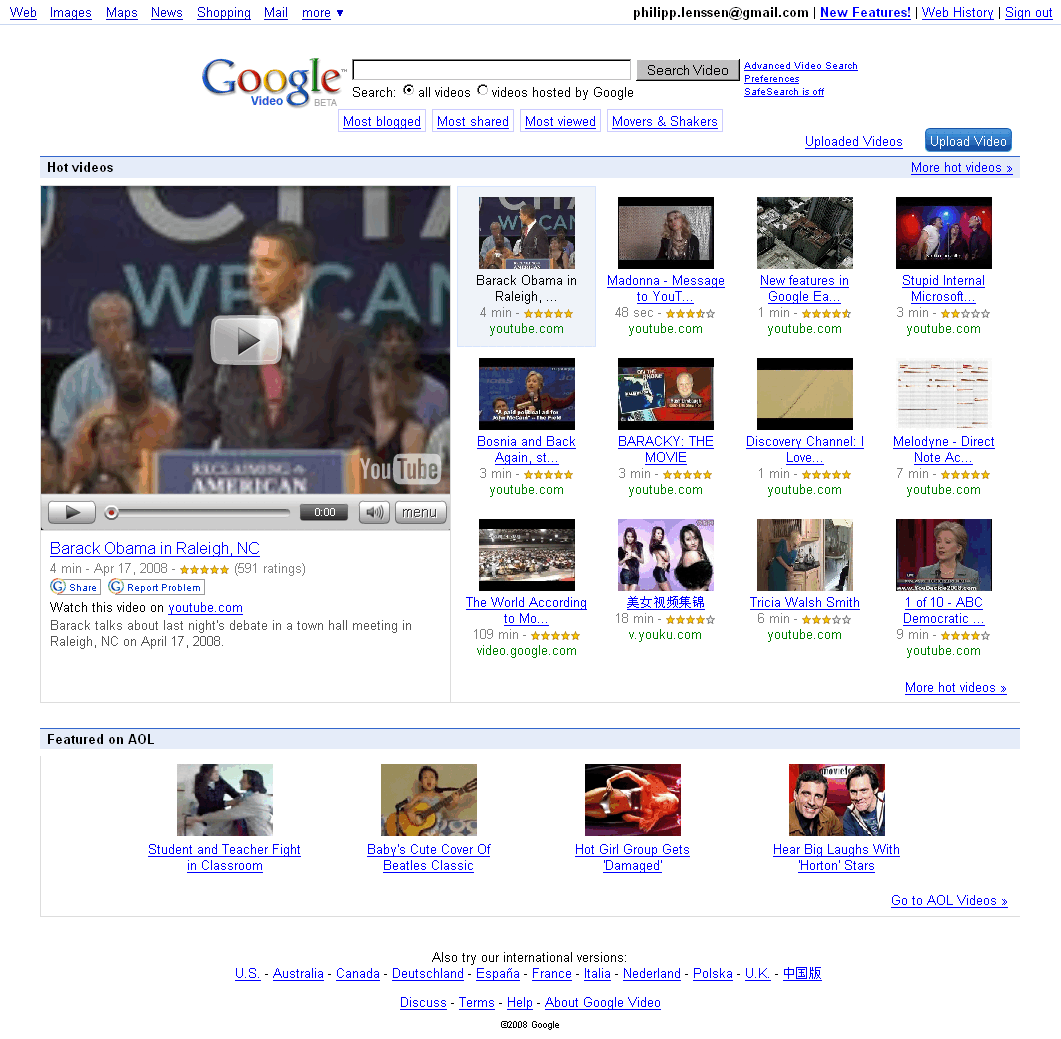
Google Video redesigned their US homepage again; above, you can see the past designs of Google Video leading to the current one*. The service started out as a video-free search service for stills and captions from TV, then became a video storage & sales site, and since last year, is a meta video search engine. The latest design recommends a couple of “hot videos,” which play in a left-side player if you click on them. “The hot video list is compiled by looking at a variety of signals including videos that most shared, viewed and blogged about,” Google says. Most of the video recommendations at the moment are from Google-owned YouTube.


Below the hot videos, another section lists videos “Featured on AOL” probably put up due to the alliance between Google and AOL; this is typical of how portal-style sites usually emphasize what their partners have to offer as opposed to what the user may really look for.


The Google Video player page has also been reorganized. It looks a bit more organized and application-like now, letting you expand and collapse its elements, and using tabs or arrow-button paging to organize comments and other features.


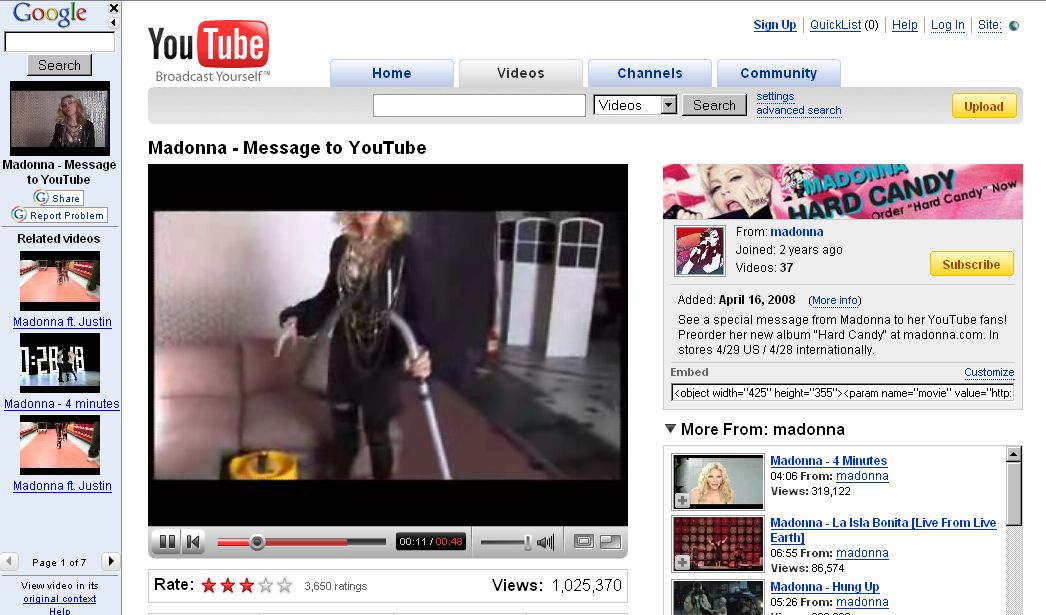
When you play videos from other sites, Google continues to wrap them in a frame, but Google’s part of the frame is now positioned to the left instead of the top, perhaps to not push down videos too much on the page:


Google’s frame can be closed with an X to its top right, but that won’t remove the frameset itself, so the video URL (e.g. when shared with friends) will still point to Google; you can click “original context” at the bottom of Google’s frame though to remove their frameset completely**.


I’m curious how this frame benefits Google users in the first place though. At Google images, where a similar frame is used, it serves a purpose because the target image is often buried deep down in the page, making it harder to find (clicking on the thumbnail at the top will lead directly to the image then). Usually no such obstacle is found on video result pages, though, where the video is visible immediately – perhaps making the first beneficiary of that Google frame Google Inc itself, as it makes users stay longer on their site. What’s more, Google’s “share” and “related videos” features offered in their frame are usually redundant as the target video site already offers these. (In 2004, Google co-founder Larry Page told Playboy, “We want you to come to Google and quickly find what you want. Then we’re happy to send you to the other sites. In fact, that’s the point. The portal strategy tries to own all of the information.” The 4 years that passed since then are a long time on the web.)


Google Video’s search result pages changed in this redesign, too. By default you will see a thumbnail to the left and snippet and link too the right, ordered in a list view. But now you can toggle to a grid view as well as a TV view on top. The TV view splits the page into a list to the left and a player widget to the middle right. Clicking on a result in the TV view will dynamically embed the other video sharing site’s video. While this also keeps users longer at Google Video than at other sites, this time the feature makes sense for users, as no features (like related videos, or sharing) are mirrored on the page. Video sharing sites will likely continue to add more commercials of their own right into the embedded films to make money, independent of which site the user is on. However, the end result of the TV view is not quite as fluent as zapping through TV channels at all time because partly, the external site (like tudou.com) will be very slow to load.

Upload Photos Directly to Google's Picasa with Panasonic's WiFi Camera

Panasonic (News - Alert) has introduced a new addition to its TZ-family of digital cameras, the Panasonic LUMIX DMC-TZ50, which is complete with WiFi capabilities, including standard 802.11b/g connectivity and access to T-Mobile (News - Alert) HotSpot services. Users can upload digital photos taken with the TZ50 directly to Picasa Web Albums, a free online photo sharing service from Google. The 9.1 megapixel TZ50 is packed with a 28mm wide-angle lens, 10x optical zoom and the ability to record HD video, making it the ideal digital camera for active users.


Alex Fried, National Marketing Manager, Imaging, Panasonic Consumer Electronics Company, said that Panasonic LUMIX DMC-TZ50 makes it possible for users to share their photos with friends and family with unprecedented ease and without a computer. He added that active users will appreciate the TZ50’sWiFi ( News - Alert) capabilitilies, so they can share photos while away from their PCs, but they will also benefit from HD video recording and the other advanced features of the device.

Panasonic uses the T-Mobile HotSpot service and Picasa Web Albums’ APIs to create a new optimal online environment and community for sharing digital photos. After taking photos with the new Panasonic LUMIX TZ50, users will be able to wirelessly send one or multiple photos at a time, directly toGoogle’s ( News - Alert) Picasa Web Albums. Users can connect to standard wireless home networks to T-Mobile HotSpots, which provide fast and reliable wireless Internet access at more than 8,800 public locations throughout the United States, including Borders stores, Hyatt Hotels, and many major airports.

Notably, the new TZ50 integrates the capability of recording 720p HD motion pictures together with its direct output function allowing users to enjoy watching both still and motion pictures in impressive HD quality on an HDTV via an optional component cable or by inserting the SD Memory Card into the SD slot.

The Panasonic LUMIX TZ50 also incorporates Panasonic’s advanced Intelligent Auto (iA) mode, consisting of seven intuitive technologies, Intelligent Exposure, Digital Red-eye Correction, MEGA O.I.S., Intelligent ISO, Intelligent Scene Selector, Face Detection and Continuous AF, all of which are specifically designed to help make photo-taking enjoyable and easy.

The TZ50 incorporates the Venus Engine IV, Panasonic’s new high-performance image processing LSI. The Venus Engine IV produces higher-quality pictures than its predecessor, the Venus Engine III, by using a more advanced signal processing system. The new Venus Engine IV also improves noise reduction, elevates the detection accuracy and corrective effects in both MEGA O.I.S. and Intelligent ISO and reduces the shutter release time lag.

Once a user is in iA mode, these functions happen automatically — no adjustments or settings changes need to be made. Furthermore, the DMC-TZ50 boasts an Intelligent LCD feature, which detects the lighting condition and controls the brightness level of the LCD in 11 fine steps, to offer a display with excellent clarity in any situation with the newly developed 460,000-dot high resolution in 3.0-inch LCD screen.

In its commitment to provide consumers with extensive imaging resources, Panasonic established the Digital Photo Academy, a series of nationwide workshops designed to instruct consumers how to optimize the features on their digital cameras and produce high-quality photos.

Microsoft Mulls Subscriptions, Ads for Office Apps

Windows remains the dominant OS in the PC world, but the largest portion of Microsoft's income actually comes from its business software division, responsible for Office and Microsoft Dynamics. For years Microsoft has struggled to maintain its revenue stream from these   products, however; Office, in particular, presents a challenge, since customers are often skeptical of an upgrade when they don't use all the features of the current version. Meanwhile, Microsoft faces growing challenges from the likes ofOpenOffice.organdGoogle Docs.

Now comes news that Redmond is experimenting with not one, but two new business models for its productivity apps, both targeted at low-end customers. The idea is that customers won't purchase the software at all. Instead, they will subscribe to it -- or, potentially, get it for free in an ad-supported model.

Thesubscription-based version of Microsoft Officeshould arrive by the end of this year, according to Microsoft reps. It will bundle Microsoft Office Home and Student Edition with Windows Live applications for e-mail, instant messaging, and photo sharing, plus the Office Live Workspace online collaboration service. No pricing has been set, but it would need to cost less than $12.50 per month to beat the list price of the Home and Student Edition of Office alone, or less than $33 per month to remain competitive with Microsoft Office Standard Edition.

If even that seems too expensive, Microsoft has begun testing another option: a free version of the low-end Microsoft Works application suite that isunderwritten by advertising.The pilot project is so hush-hush that you can't get it in the U.S. yet, but if it's successful in its demo markets you may begin to see new PCs shipping with a fully-functional office application suite pre-installed, at no additional charge.

  Of course, all this implies that you desperately need office applications from Microsoft. If cost is your only concern, you can already install open source productivity applications for free, or use online services from Google,Zoho, and others. In truth, these moves might benefit Microsoft the most, because they help bring the company one step closer to its dream software model: a subscription-based business that brings in steady revenue and isn't tied to annual upgrade cycles.

What's your ideal purchasing model for business software? Are you happy with the way it works now, or do subscription, online, or ad-supported models have appeal to you? Sound off in the PC World Community Forums.

Good News for AJAX – The Browser Wars Are Back

After years of dominance by a single browser, Microsoft’s Internet Explorer (IE), and few advances within IE, the world has changed. There is now healthy competition among multiple browsers over standards compliance, AJAX features, AJAX performance and trustworthy computing. The competition is reaching beyond the desktop to include the emerging world of mobile browsing. This healthy competition will result in important new capabilities within AJAX toolkits and will help accelerate the adoption of Web 2.0 and Enterprise 2.0 technologies.

The Era of the Single Browser Is Over

For much of this decade, Web browsing has been dominated by Microsoft’s Internet Explorer (IE), which at its height achieved market share numbers approaching 95%, with the result that Microsoft owned a de facto standard for the Web and held effective veto power over the future of HTML. During much of this period, Microsoft suspended development of IE, with the result that virtually no new features appeared within the world’s dominant browser from 2001 to 2006.

But while IE was sleeping, one of the biggest phenomena of the computer age happened: AJAX. Clever Web developers discovered gold in them there mountains. Using AJAX techniques, Web developers could create desktop-like rich user interfaces right in the browser. Not only that, AJAX was evolutionary. AJAX offered an incremental path from the industry’s existing HTML-based infrastructure and know-how, allowing Web developers to add rich AJAX elements to an existing HTML page.

Like the California gold rush of 1949, the years of 2005-2007 saw an AJAX gold rush, where hundreds of AJAX commercial software products and dozens of open source projects came to the market. Looking back, it is truly astounding that AJAX went from an idea in 2005 to become part of the Web development mainstream by 2008.

HTML5 and the Acid Tests – Advancing AJAX and the Open Web

The HTML5 initiative, initially launched within the WhatWG and now embraced by the W3C, has turned the Web standards world from a glacial process into an avalanche of new browser features.

Today, all of the browser vendors are contributing to HTML5, and the latest major browser releases (IE8, Firefox 3, Opera 9.5, and Safari 3.1) are all shipping various features from HTML5 (and related W3C standards) in advance of formal approval by the W3C.
A companion community effort helping to accelerate the adoption of open standards is the Web Standards Project (http://www.webstandards.org), which is producing a set of “acid tests” that verify browser support for Open Web technologies, such as HTML, CSS and JavaScript. Acid2 is focused mainly on CSS support, and is now supported by Opera, Safari/WebKit, and IE. Acid3 (http://www.webstandards.org/action/acid3) tests DOM scripting, CSS rendering, SVG, and Web fonts. The first browser to pass Acid3 is the WebKit open source project (used by Safari). Due to their high visibility in the industry, the Acid tests are helping to drive browser support for open standards.

Open Source Browsers and the Mobile Web

The last few years have seen the rise of two major open source browser projects, Mozilla (the engine in Firefox) and WebKit (the browser engine on the Apple Macintosh, the Apple iPhone, Nokia phones and Google Android). In the past few years, Firefox and Safari have taken significant market share away from IE.

A related development is the growth of Web browsing on mobile phone. In the coming years, Web browsing from handheld devices will become a mainstream feature, with the result that billions of cell phone users will be browsing the Web. The WebKit open source project, in particular, is an early darling of the mobile device manufacturers. WebKit-based browsers ship on phones from Apple and Nokia, is included within the Google Android platform, the Trolltech Qtopia platform, is being ported to Windows Mobile, and has been announced for future Motorola phones. Opera browsers also have significant market share. In early 2008, Microsoft announced Windows Mobile 6, which includes a mobile version of IE6. WebKit, Opera, and IE6 all support AJAX.

IE 8 joins the browser arms race

Today, all of the browsers, including IE, are very much awake and on the move. We are seeing a new, healthy competition among the browser vendors to compete for the hearts and minds of end users and Web developers. The browsers are in a heated competition to deliver the best features and the best performance. As a result, the latest browsers have released a series of important AJAX enhancements.

After months of secrecy and industry speculation, Microsoft recently unveiled the features in the upcoming IE 8, showcasing an impressive set of new features important to the AJAX community. IE 8 includes support for several new features from HTML5 and passes the Acid2 test. Additionally, IE 8 performance for various JavaScript and DOM operations is considerably faster than IE 7.

But it isn’t just Microsoft that is on the move. Over the past few years, Opera and Firefox have been the leaders in standards support in general. Recently, Safari/WebKit has been adding major new features in rapid succession, including SVG, animations and video. Here is a partial list of new AJAX-related features that are either working today or under active development within the major browsers:
  • IE – CSS 2.1, W3C Selectors, cross-frame messaging, offline storage, and cross-domain AJAX requests
  • Firefox/Mozilla – CSS 2.1, W3C Selectors, cross-frame messaging, offline storage, cross-domain AJAX requests, Canvas, SVG
  • Safari/WebKit – CSS 2.1, W3C Selectors, CSS animations, CSS web fonts, cross-frame messaging, offline storage, Canvas, SVG, <audio>, and <video>
  • Opera – CSS 2.1, W3C Selectors, CSS web fonts, cross-frame messaging, offline storage, cross-domain AJAX requests, online/offline events, persistent connections, server-sent events, Canvas, SVG, contentEditable, and <video>

An AJAX-specific wishlist led OpenAjax Alliance

Therefore, the Open Web world already is moving quickly to advance AJAX technologies via various open standards and community processes. However, HTML5 targets a broad set of Web scenarios, where AJAX application development is just one among many target use cases.

To make sure there is good focus on the unique requirements of the AJAX community, the OpenAjax Alliance has launched an AJAX browser wishlist initiative through its Runtime Advocacy Task Force. The initiative is a wiki-based collaboration among the leading AJAX developers in an attempt to accelerate the delivery of browser enhancements needed by the AJAX community.

Beyond just a feature list, the Runtime Advocacy initiative supplements each feature request with supplemental technical details, such as explanations of why exactly a particular feature is required, along with suggested technical approaches, and discussion comments from industry leaders about the preferred technical strategies for delivering each particular feature.

But perhaps the most important aspect of the OpenAjax browser wishlist is the voting process, where the participants assign priority rankings to the various features. These rankings will inform the browser vendors not only which features are most critical to Web developers, but also allows them to see which parts of the AJAX community are requesting a particular feature and why developers feel the feature is critical.

The first release of the OpenAjax browser wishlist will happen in the mid-summer 2008 timeframe, which we believe will align with the planning processes within the browser vendors for their next major browser releases (presumably, Firefox 4, IE 9, Opera 10 and Safari 4). Here is the full schedule for the AJAX wishlist initiative:
  • April 2008 - Phase I review, where participants not only add comments, but also are asked to identify their Top 5 features (i.e., those features that are most critical for inclusion in next-generation browsers).
  • May 2008 - The moderators reorganize and possibly trim away feature requests for which little interest was shown.
  • June 2008 - Phase II review, where participants will be asked to provide importance ratings for each of the feature requests on a scale of 0.0 to 5.0.
  • July 2008 - The moderators will produce a summary report and notify the major browser vendors about the results.

Who can participate and how to join the effort

For the browser wishlist initiative, the alliance is reaching out to leading AJAX toolkit developers and other technical experts in AJAX application development.
The first wave of participants have been representatives from many of the leading AJAX toolkits. Among the AJAX toolkits and industry experts who have contributed to the effort in its early stages are ASP.NET AJAX (Microsoft), Dojo Toolkit, Douglas Crockford (of JSON fame), DWR, Ext JS, jQuery, Prototype.js, Spry (Adobe) and XAP.

The alliance also wants to reach out beyond the AJAX toolkit providers to leading AJAX developers, particularly Enterprise developers. Anyone from the community can participate in this effort, whether a member of OpenAjax Alliance or not. Instructions for how to join the effort can be found on the main wiki page for the initiative (http://www.OpenAjax.org/runtime/wiki). Once you have a wiki login, you can freely modify existing feature requests, add new feature requests, and vote for which features are most critical.

Some of the features requested so far

The table below shows some of the features from early versions of the wishlist, before voting and prioritization:

Some early entries in the OpenAjax Alliance Browser Wishlist
Security
Better security for cross-site scripts, stronger protection against cross-site request forgery, enhanced security for IFRAMEs
Communications
More than 2 HTTP connections per window, persistent connections (to support Comet)
HTML5/W3C
2D graphics, video, audio, offline, mutation events
Rendering and interactivity
Better APIs for positioning and styling, improved layout support, better support for rich text editing, better support for drag/drop and copy/paste
Other
AJAX toolkit caching, JavaScript pause/release

What we hope to accomplish

The wishlist is focused on identifying higher-level requirements (e.g., offline support, better APIs for positioning and styling) instead of requesting specific solutions. Our assumption is that the browser teams and the relevant standards efforts (e.g., HTML5) will work out the technical details in order to address the requirements from our wishlist.

We don’t expect agreement among the contributors. Different people have different requirements and differing technical vision. The important thing is to capture the various points of view so that the browser teams and the HTML5 standards effort have the best possible information from which they can work out the details.

What this means to AJAX

The healthy, fast-paced competition that we are seeing among the leading Web browsers delivers three main benefits to the AJAX developer community:
  1. Better interoperability, which translates into increased innovation – As newer version of browsers support open standards more completely and reliably, and as older machines are retired, the AJAX toolkit vendors can innovate more quickly as they spend less time working around incompatibilities and bugs.
  2. Better performance, which translates into more power and greater scalability – The healthy performance battle taking place today among the browser vendors will enable future versions of AJAX toolkits to deliver new features that were not feasible in older, slower browsers (particularly IE6, which is infamous in the AJAX developer community for its performance shortcomings).
  3. New browser features, which translates into new types of applications – Many of the features coming in recent Web browsers will enable major advances the features that will be available to AJAX developers. Offline features will enable AJAX applications to run even when disconnected from the network (e.g., in an airplane). The cross-frame messaging and cross-domain AJAX request features will help deliver secure mashups at high performance. The vector graphics, animation and video features will allow seemless integration of rich UI experiences and multimedia, without having to bridge between the Open Web and proprietary platforms.

About the Alliance

The OpenAjax Alliance is an organization of vendors, open source projects and companies using AJAX that are dedicated to the successful adoption of open and interoperable AJAX-based Web technologies. The alliance’s prime objectives are: accelerate customer success with AJAX by promoting a customer's ability to mix and match solutions from AJAX technology providers, educate the AJAX developer community about how to use AJAX technologies and techniques successfully, and help drive the future of the AJAX ecosystem. The browser wishlist is one of the key initiatives at the OpenAjax Alliance towards helping to shape the future of the AJAX ecosystem. Other OpenAjax initiatives address AJAX toolkit interoperability (OpenAjax Hub 1.0 and OpenAjax Registry), secure mashups (OpenAjax Hub 1.1), IDE standards and widget standards (OpenAjax Metadata), activities related to AJAX security, and activities related to Mobile AJAX.